
Following the below instructions, you will learn how to clear the alert notifications from the home page.
How to clear the ‘Update of your Crisis Management Contact Details’ alert notification:
1. Now that your crisis contacts have been updated, you need to open the ‘Company’ menu then click on ‘Alert Responses’.
2. Double click on the ' Update of your Crisis Management Contact Details' alert top open it.
3. When this window is open, click on ‘Actions’ then ‘Edit’
4. Double click on the alert you would like to open. Note: the status will appear as a red X as you have not responded to the alert yet.
5. Tick the appropriate response in the ‘Questions’ tab and fill in the ‘General Comments’ tab if necessary.
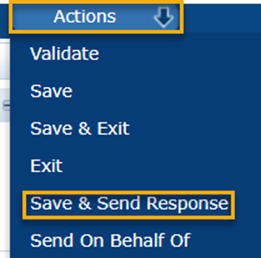
6. Then click ‘Actions’ then ‘Save and Send Response’
7. Confirm your response by clicking ‘Ok’
The alert will then disappear, no further action is required.
Feel free to contact us by email at plmscamark@msacsolutions.com
You can also contact one of our technical support team members between 9am and 5pm Monday through Friday (Central European Time) by calling +33 1 76 28 43 76
Comments
0 comments
Article is closed for comments.